Fixing Job Assignments in an RTS: From Tedious to Tactile
- Diener Brothers
- Development , Game design
- September 14, 2025
Table of Contents
The Problem with Job Assignments in Most RTS Games
In many RTS games, managing your workers feels disconnected. You click a unit, navigate a menu, and select a job from a list. It’s an abstract process that turns your divine oversight into a series of UI clicks, pulling you out of the world and into the menus. We wanted to get rid of that disconnected feeling.
In Grey, we want you to feel like you’re directly interacting with the world. The “god hand” is a core part of that. So, we asked ourselves: why can’t assigning jobs be as simple and satisfying as picking up a unit and putting it to work?
Our Solution: The Job Preview System
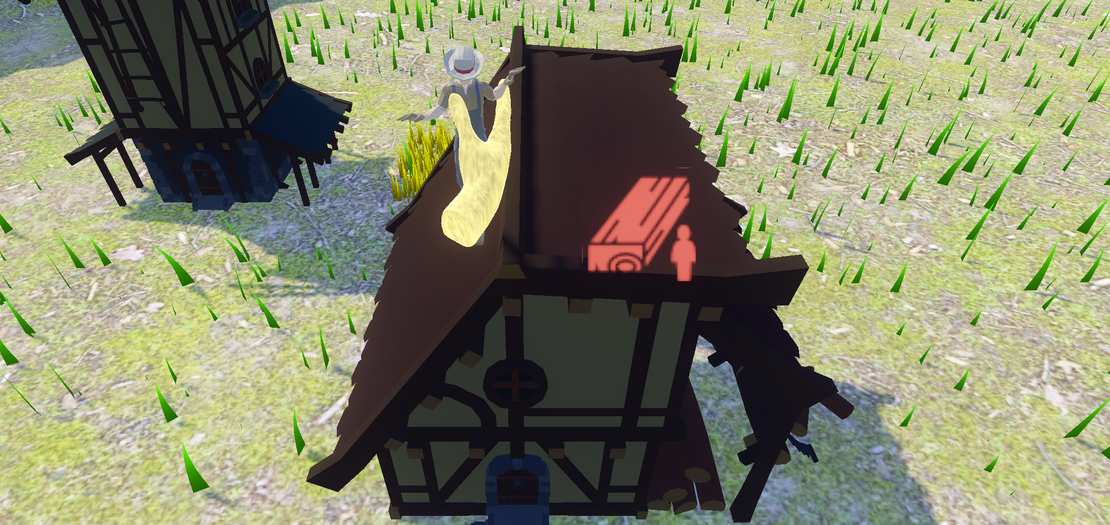
Our answer is the Job Preview System. The moment you pick up a worker with your divine hand, the world itself shows you where they can work. No menus, no clicking through UI. Just a clear, immediate visual connection between a worker and their potential jobs.
Here’s how it works:
- Pick Up a Unit: Grab any worker with your divine hand.
- See Available Jobs: Instantly, icons appear above all buildings that have an open job slot for that unit.
- Drop to Assign: Place the unit on the building, and they’re assigned the job. They’ll get to work right away.
It’s a simple, intuitive system that feels tactile and immediate. It turns a chore into a satisfying interaction.
How It Works Under the Hood
To make this work, we needed a system that was both scalable and performant. We created a simple IJobRoleProvider interface in C#:
public interface IJobRoleProvider
{
    JobRole GetJobRole();
    bool CanAcceptWorker();
    Vector3 GetWorkerPosition();
}
Any building that implements this interface can offer jobs. When you pick up a unit, the system quickly scans for nearby IJobRoleProviders and displays the appropriate icons.
The icons themselves are rendered as 3D billboards. This means they exist in the game world, but always face the camera so they’re easy to read. This avoids the jarring experience of having UI elements that feel disconnected from the world itself.
Why This is More Than Just a UI Fix
This isn’t just about saving a few clicks. It’s about changing the feel of the game.
- It’s more immersive. You’re not managing a spreadsheet; you’re placing your people where they need to be.
- It’s more intuitive. The game shows you what you can do, right where you can do it. No need to memorize which buildings have which jobs.
- It’s faster. You can re-assign workers on the fly without pausing the action to navigate menus.
This system is a small part of our larger design philosophy for Grey: every interaction should reinforce the feeling of being a powerful, divine presence in the world.
We’re still refining the system and adding more features, like showing worker skill compatibility and resource requirements directly on the job preview icons. But the core is there, and it already feels so much better than the old way of doing things.
Let us know what you think!
The Diener Brothers
🎮 In #Grey, we're experimenting with physical job assignment to expand the interaction options:
— Diener Brothers (@dienerbrothers) September 14, 2025
✨ Pick up units with divine hand
🏗️ Drop on buildings = instant job assignment
👁️ Visual previews show available roles#GameDev #GodGame #RTS #UX pic.twitter.com/EukpruzeEz